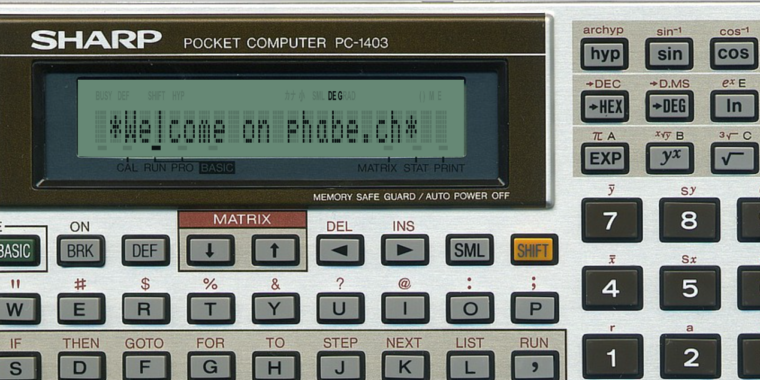
My C64 had already done the damage. By the time I entered the ‘Kanti’, I was firmly convinced that computers were the most interesting thing in the universe. The one thing the Brotkasten could not do was come to school with me. A Sharp PC-1403 could. Twenty-four characters of LCD, a real BASIC interpreter, a scientific calculator mode and a keyboard that fit next to my pencil case. If the C64 lit the fire, the PC-1403 was the machine that kept it burning through every double lesson of math.
The best part: the Sharp wasn’t contraband — it was part of the curriculum. In math class, we actually learned to program on it. Our teacher had us write BASIC programs as part of the lessons, and we developed little programs together in class. School had officially handed me a programmable computer and told me to use it. It was the perfect crime, except it was entirely legal.
Naturally, I did what any computer-loving teenager would do with a programmable calculator: I wrote programs for math class. Little BASIC programs that made life in math class noticeably easier. My classmates noticed. Classmates who owned a PC-1403 became customers. I sold them programs, one by one, and eventually bundled the whole collection into a “book” that was sold at school. After the Matura I even tried to get it published by a real publisher. The publisher, sadly, held a different opinion about the market for pocket-computer math programs. 🙂
About thirty years later the PC-1403 in my drawer still works! But a working original was not the point. After the C64 post, where I deliberately went for nostalgia, not accuracy, I wanted the exact opposite this time: the whole machine, in the browser, cycle by cycle.
The role of Walter Fischer
Before any technical detail, the most important paragraph of this post. This emulator would not exist without Walter Fischer and his site cavefischer.at. Walter documents Sharp pocket computers with a thoroughness that puts the original manuals to shame: memory maps, token tables, port addresses, the 11-pin interface, the key code of every single one of the 76 keys. He provided sources, documents, code and photos of real machines. The device photo you see in the emulator is his, used with his kind permission.
And then he did the thing that really made the difference: he tested the emulator with his own BASIC and machine-code programs and reported back, patiently, what the real hardware did differently. His decimal-to-binary converter, a BASIC loader that pokes 603 bytes of machine code to &E000 and then calls it, became the final exam. It now runs on the emulated PC-1403H exactly as on his real one.
Danke, Walter!
What’s inside: everything. Literally.
This is not a “looks like a PC-1403” web page. It emulates the complete machine, and with the original firmware it behaves identically to a real PC-1403 and PC-1403H, down to the boot question `MEMORY ALL CLEAR OK?` and the error codes:
- the SC61860 CPU, cycle-counted, including HALT and power-off, the timer and the BCD arithmetic
- the full memory map with the gate-array latches, ROM bank switching (4 × 16 KB) and 8 KB or 32 KB of RAM, depending on which model you pick
- a pixel-exact LCD, 24 characters of 5×7 dots plus every status indicator (BUSY, DEF, SHIFT, CAL/RUN/PRO, DEG/RAD/GRAD, …) at its original position, drawn right over the display glass of the device photo
- a photorealistic keyboard: the photo with precisely placed click regions, plus host-keyboard mapping with automatic SHIFT combinations, so you can type or paste whole programs
- the piezo beeper, driven by the CPU’s port events through WebAudio
- a debugger with registers, disassembly, internal RAM, breakpoints, and a turbo mode for the impatient
- a “memory safe guard” that keeps your programs in the browser between visits
Everything is TypeScript, Vite, Canvas and WebAudio. No server, no backend, nothing leaves your browser.
I built it with Claude Code. In the C64 post, Antigravity was my co-pilot. This time Claude Code wrote most of the code while I did the archaeology: Walter’s tables, Jürgen Schulze’s System- und Programmbuch from 1987, the MAME driver as a reference, and a disassembly of the internal ROM to understand what the boot code actually checks. The loop was the same as last time, implement, check, fix, validate. The difference is what “check” meant. Last time it meant “does this feel like 1985?”. This time it meant “does a real PC-1403 do exactly this?”. Walter made sure the answer was honest.
The ROM Problem
There is one thing the repository does not contain: the firmware. 8 KB of internal CPU ROM and 64 KB of external ROM in four banks, all © Sharp Corporation. I cannot distribute them, and I won’t link to places that do. Without ROMs the emulator is a very pretty photo of a calculator.
The good news: if you own a PC-1403, you can read the ROMs out of your own machine. Walter has documented both procedures, and the repo has a step-by-step guide:
- External ROM banks with an Arduino UNO: cavefischer.at, “Arduino ExtROM”. A short BASIC program pokes a tiny machine routine into the Sharp, which streams every byte as two nibbles over the 11-pin interface with a proper handshake. The Arduino collects them on the serial monitor. About 38 seconds and one beep later you have a CSV file with all four banks. Using AI, the script can easily be transformed to be used on a micro:bit or other microcontroller of your flavour.
- Internal ROM: cavefischer.at, “Auslesen des internen ROMs”. The internal ROM can only be read through the `DATA` trick, and Walter explains how.
- ROM-Dump Guide: This guide I generated using Claude. It has the wiring table (six wires and a handful of pull-down resistors), and tools/csv2rom.py turns the CSV into the five .bin files, reports missing addresses and prints the CRC32 values so you can compare them with the known ones.
Load the files through the “ROMs…” dialog (they stay in your browser’s IndexedDB) or drop them into public/roms/.
Try It!
The source code is on GitHub (MIT, with the BCD instructions ported from MAME’s “sc61860 core” under BSD-3-Clause). Here, you can test it LIVE!
And if you were one of my classmates who bought a program from me back then: the price included lifetime support. Claims can now be filed via the emulator. 🙂